Market Connect-Exec: A Python Library for Multi-Broker Execution and Market Data
Tools Documentation
marketconnect-exec is a Python library for quant traders and portfolio managers. It provides a unified interface to Deribit and Interactive Brokers — covering order management, positions, account data, market data, and derivatives analytics through a single, consistent API.
Antoine
CEO - CodeMarketLabs
2026-03-14
marketconnect-exec: A Python Library for Multi-Broker Execution and Market Data
marketconnect-exec is a Python library designed for quantitative traders and portfolio managers who need a clean, unified interface to interact with multiple brokers from a single codebase. Built around an abstract adapter pattern, it currently supports Deribit and Interactive Brokers (IBKR) — covering the full trading workflow: connecting, placing and managing orders, retrieving positions and account data, fetching market data, and querying derivatives analytics. A central router and execution layer dispatch every call to the right broker automatically, so your strategy code stays broker-agnostic.
What the library provides
Abstract adapter pattern: add a new broker by implementing one class, nothing else changes.
Unified order management: stage, cancel, and monitor orders with normalized enums across all brokers.
Market data: historical OHLC, close prices, live quotes, order book depth, and last trades.
Derivatives analytics: implied volatility, volatility surface with filtering, and futures chains.
Broker-specific field mapping: order types, sides, and time-in-force translated automatically per broker.
1. Architecture: Router & Adapter Pattern
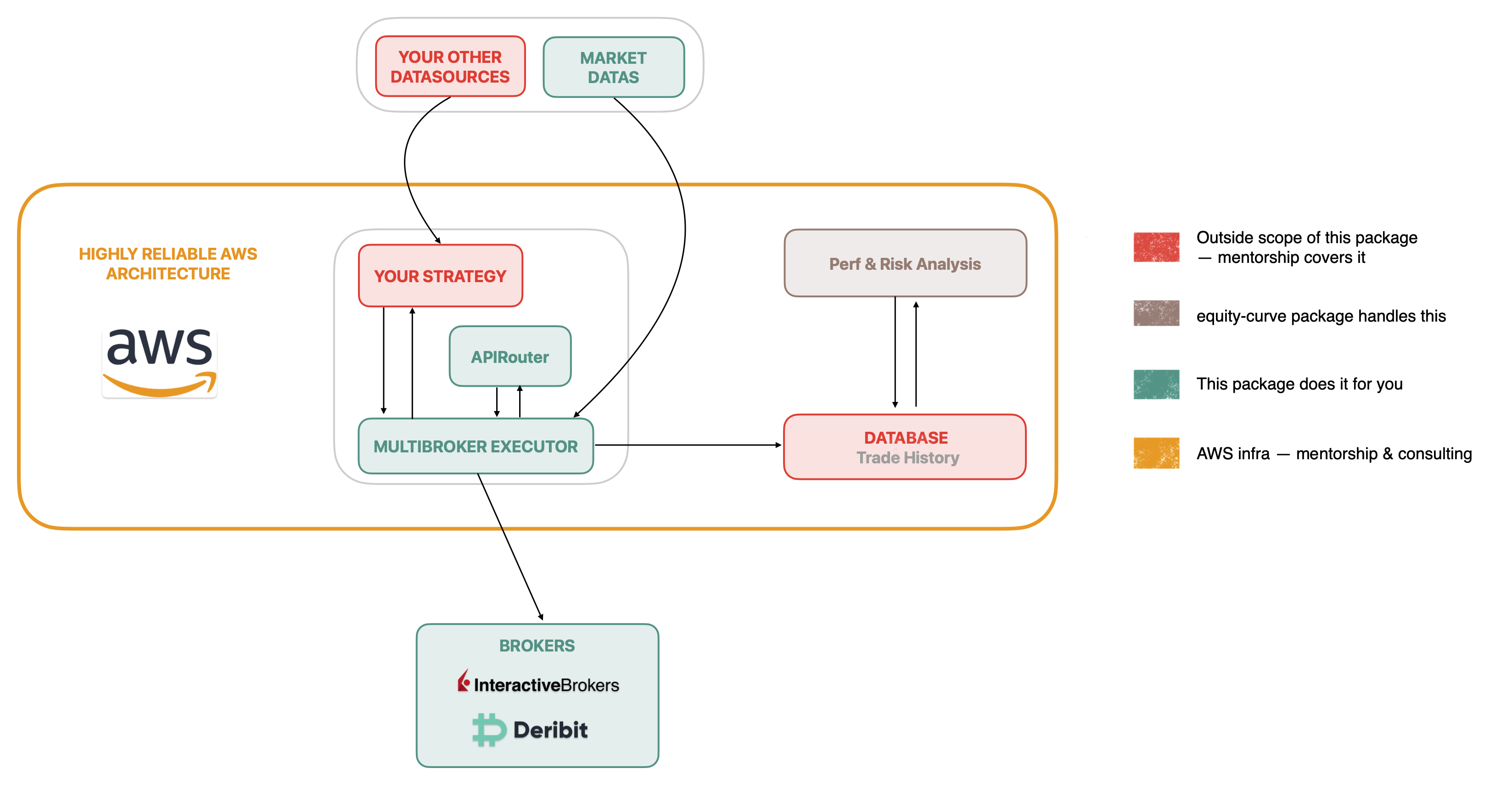
The library is built around two core abstractions. AbstractBroker defines the full contract every broker must implement — connection, order management, positions, market data, and derivatives. APIRouter is a lightweight registry that holds broker adapter instances and dispatches calls by name. The Execution class wraps the router and provides the public API your trading code calls. This layering means you can swap or add a broker without touching any strategy logic.
python
from marketconnect_exec.core.router import APIRouter
from marketconnect_exec.core.execution import Execution
from marketconnect_exec.brokers.deribit.adapter import DeribitAdapter
from marketconnect_exec.brokers.ibkr.adapter import IBKRAdapter
# --- Register broker adapters ---router = APIRouter()# Deribit — crypto derivativesrouter.register_broker(DeribitAdapter( client_id="YOUR_API_KEY", client_secret="YOUR_API_SECRET"))# Interactive Brokers — equities, ETFs, optionsrouter.register_broker(IBKRAdapter( host="127.0.0.1", port=7497,# 7497 = paper, 7496 = live client_id=1))# Connect all registered brokers in one callrouter.connect_all_brokers()# Execution layer — single entry point for all broker operationsexec= Execution(router)# Check connection state on any adapteradapter = router.get_broker_adapter("deribit")print(adapter.is_connected)# True# Graceful shutdownrouter.disconnect_all_brokers()
L'infrastructure de trading algorithmique rendue possible par marketconnect-exec
2. Static Types: Orders, Brokers & Time-in-Force
All parameters are typed with enums defined in the static module. OrderSide, OrderType, TimeInForce, and BrokerName are used consistently across every function — no raw strings. The Mapping class handles the translation from these universal enums to broker-specific values (e.g. OrderType.LIMIT becomes 'LMT' for IBKR and 'limit' for Deribit). OrderTicket is the normalized dataclass returned by every order placement, regardless of broker.
The stage_order method is the primary execution entry point. It accepts universal enums and returns a normalized OrderTicket with broker name, order ID, symbol, creation timestamp, and all order parameters. Cancellation and status queries follow the same pattern — pass the BrokerName enum and the order_id returned by the ticket. All three methods are available on the Execution object and route transparently to the correct adapter.
python
from marketconnect_exec.static.brokers import BrokerName
from marketconnect_exec.static.orders import OrderSide, OrderType
from marketconnect_exec.static.time_in_force import TimeInForce
# --- Place a limit buy on Deribit ---ticket =exec.stage_order( broker=BrokerName.DERIBIT, symbol="BTC-PERPETUAL", side=OrderSide.BUY, quantity=1.0, order_type=OrderType.LIMIT, price=65_000.0, time_in_force=TimeInForce.GTC
)print(ticket.order_id)# e.g. '12345678'print(ticket.broker_name)# 'deribit'print(ticket.creation_date)# datetime object# --- Place a market sell on IBKR ---ibkr_ticket =exec.stage_order( broker=BrokerName.IBKR, symbol="AAPL", side=OrderSide.SELL, quantity=100.0, order_type=OrderType.MARKET, time_in_force=TimeInForce.IOC
)# --- Stop-limit on Deribit with reduce_only ---stop_ticket =exec.stage_order( broker=BrokerName.DERIBIT, symbol="ETH-PERPETUAL", side=OrderSide.SELL, quantity=5.0, order_type=OrderType.STOP_LIMIT, price=3_000.0, stop_price=3_050.0, time_in_force=TimeInForce.GTC, reduce_only=True)# --- Monitor and cancel ---status =exec.get_order_status(BrokerName.DERIBIT, ticket.order_id, symbol="BTC-PERPETUAL")print(status)# broker-native status dictexec.cancel_order(BrokerName.DERIBIT, ticket.order_id, symbol="BTC-PERPETUAL")
4. Positions & Account Data
The positions module gives a complete view of the account state: all open positions, filtered positions by currency or symbol, account summary, cash balance, margin requirements, and historical operations. All methods route through the Execution layer and accept an optional account parameter for multi-account setups. The get_historical_operations method is explicitly non-normalized — for IBKR it requires a pre-configured Flex Query ID passed as a kwarg, while for crypto brokers it returns universal transaction logs.
python
from marketconnect_exec.static.brokers import BrokerName
import warnings
# --- All open positions ---positions =exec.get_all_positions(BrokerName.DERIBIT)for pos in positions:print(pos)# list of dicts, broker-native fields# --- Filter by currency or symbols ---btc_positions =exec.get_specific_instruments_positions( broker=BrokerName.DERIBIT, currency="BTC"# all BTC-denominated positions)specific =exec.get_specific_instruments_positions( broker=BrokerName.IBKR, symbols=["AAPL","TSLA","SPY"]# specific tickers)# --- Account overview ---summary =exec.get_account_summary(BrokerName.IBKR)print(summary)# net liquidation, equity, P&L, etc.cash =exec.get_cash_balance(BrokerName.DERIBIT)print(cash)# {'BTC': 0.45, 'ETH': 3.2, 'USDC': 12500.0}margin =exec.get_account_margin(BrokerName.IBKR)print(margin)# initial margin, maintenance margin, available funds# --- Historical operations (non-normalized — triggers UserWarning) ---with warnings.catch_warnings(record=True)as w:# Deribit: returns universal transaction log ops_deribit =exec.get_historical_operations(BrokerName.DERIBIT)# IBKR: requires a pre-configured Flex Query ops_ibkr =exec.get_historical_operations( BrokerName.IBKR, query_id="YOUR_FLEX_QUERY_ID"# set up in IBKR Account Management)
5. Market Data
The market data module covers historical and real-time data retrieval through the same unified interface. get_histo_ohlc returns candlestick data for a given symbol and timeframe. get_histo_close_price batches multiple symbols in one call. get_quote returns the current bid/ask/last. get_order_book returns depth-of-market data, and get_last_trades returns the most recent executed trades. All datetime parameters use Python native datetime objects.
python
from datetime import datetime
from marketconnect_exec.static.brokers import BrokerName
# --- Historical OHLC ---ohlc =exec.get_histo_ohlc( broker=BrokerName.DERIBIT, symbol="BTC-PERPETUAL", timeframe="1D",# broker-native timeframe string start=datetime(2024,1,1), end=datetime(2024,12,31))# Returns dict: {'timestamp': [...], 'open': [...], 'high': [...], 'low': [...], 'close': [...]}# --- Batch close prices (useful for portfolio NAV calculation) ---close_prices =exec.get_histo_close_price( broker=BrokerName.IBKR, symbols=["AAPL","MSFT","GOOGL","SPY"], start=datetime(2024,1,1), end=datetime(2024,12,31), date_to_skip=[]# list of dates to exclude (e.g. custom holidays))# Returns dict keyed by symbol: {'AAPL': pd.Series(...), 'MSFT': pd.Series(...)}# --- Live quote ---quote =exec.get_quote(BrokerName.DERIBIT,"BTC-PERPETUAL")print(quote)# {'bid': 64980.0, 'ask': 65010.0, 'last': 64995.0, 'mark': 65000.0}# --- Order book ---book =exec.get_order_book(BrokerName.DERIBIT,"BTC-PERPETUAL", depth=10)print(book['bids'][:3])# [[price, size], ...] top 3 bidsprint(book['asks'][:3])# [[price, size], ...] top 3 asks# --- Last trades ---trades =exec.get_last_trades(BrokerName.DERIBIT,"ETH-PERPETUAL", nb_trades=20)for t in trades:print(t)# {'timestamp': ..., 'price': ..., 'amount': ..., 'direction': 'buy'|'sell'}
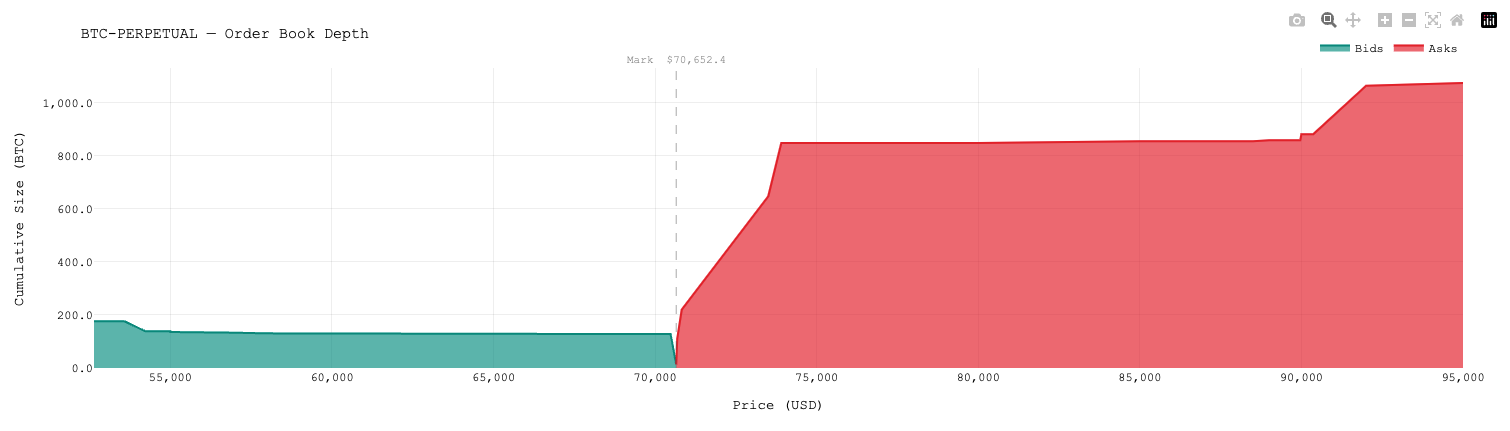
Graphique de l'order book du Bitcoin depuis Deribit API
6. Derivatives Analytics
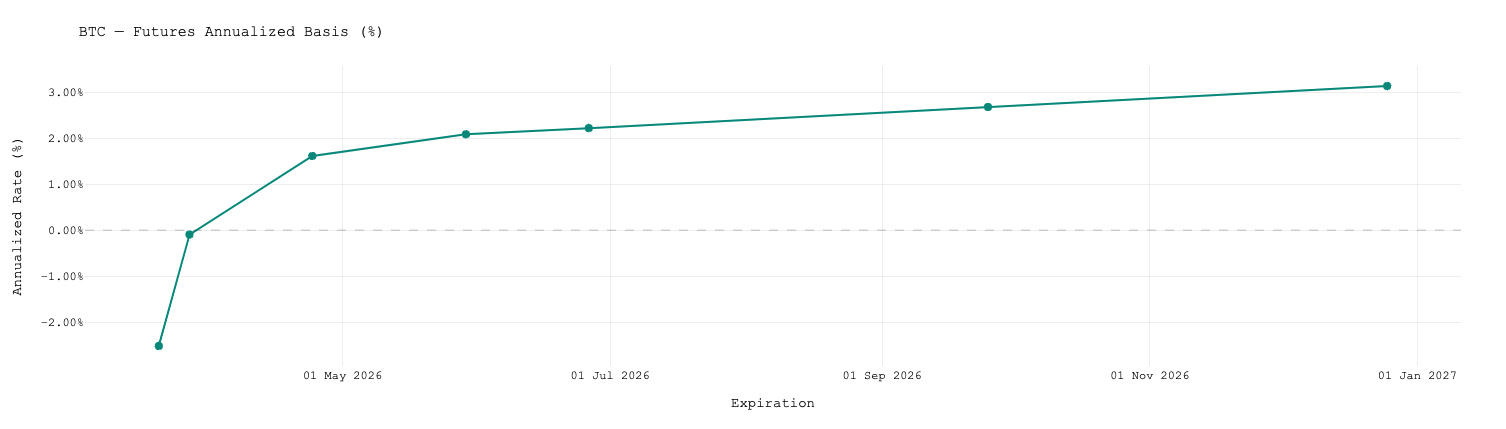
The derivatives module exposes three high-level functions. get_implied_vol returns current implied volatility for a given instrument. get_futures_chain returns the full list of active futures contracts with expiry and pricing data. get_vol_surface is the most feature-rich: it builds a complete volatility surface with extensive filtering options — by open interest, bid-ask spread quality, strike range, expiry range, and surface type (all, call, put, or OTM only). An optional spot price and strike increment enable on-the-fly surface resampling.
python
from marketconnect_exec.static.brokers import BrokerName
# --- Implied volatility for a specific instrument ---iv =exec.get_implied_vol(BrokerName.DERIBIT,"BTC-28MAR25-70000-C")print(iv)# {'mark_iv': 0.62, 'bid_iv': 0.60, 'ask_iv': 0.64}# --- Futures chain ---futures =exec.get_futures_chain(BrokerName.DERIBIT,"BTC")for contract in futures:print(contract)# {'symbol': 'BTC-28MAR25', 'expiry': datetime(...), 'mark_price': ...}# --- Volatility surface (full) ---vol_surface =exec.get_vol_surface( broker=BrokerName.DERIBIT, symbol="BTC", minimum_contract_open_interest=80,# filter out illiquid contracts filter_bid_ask=True,# remove options with no valid bid/ask filter_bid_ask_pct=0.05,# max (ask_iv - bid_iv) / mid_iv strike_range=(50_000,100_000),# keep strikes between 50k and 100k minimum_days=7,# exclude near-expiry (< 7 days) maximum_days=90,# exclude far expiry (> 90 days) surface_type='otm',# OTM puts + OTM calls only spot=65_000.0,# reference spot for moneyness calc strike_increment=1_000# resample grid to 1k increments)# Each entry in the list is a dict:for point in vol_surface[:3]:print(point)# {'symbol': 'BTC-28MAR25-65000-C', 'strike': 65000,# 'expiry_days': 14, 'mark_iv': 0.58, 'delta': 0.51, 'open_interest': 320}
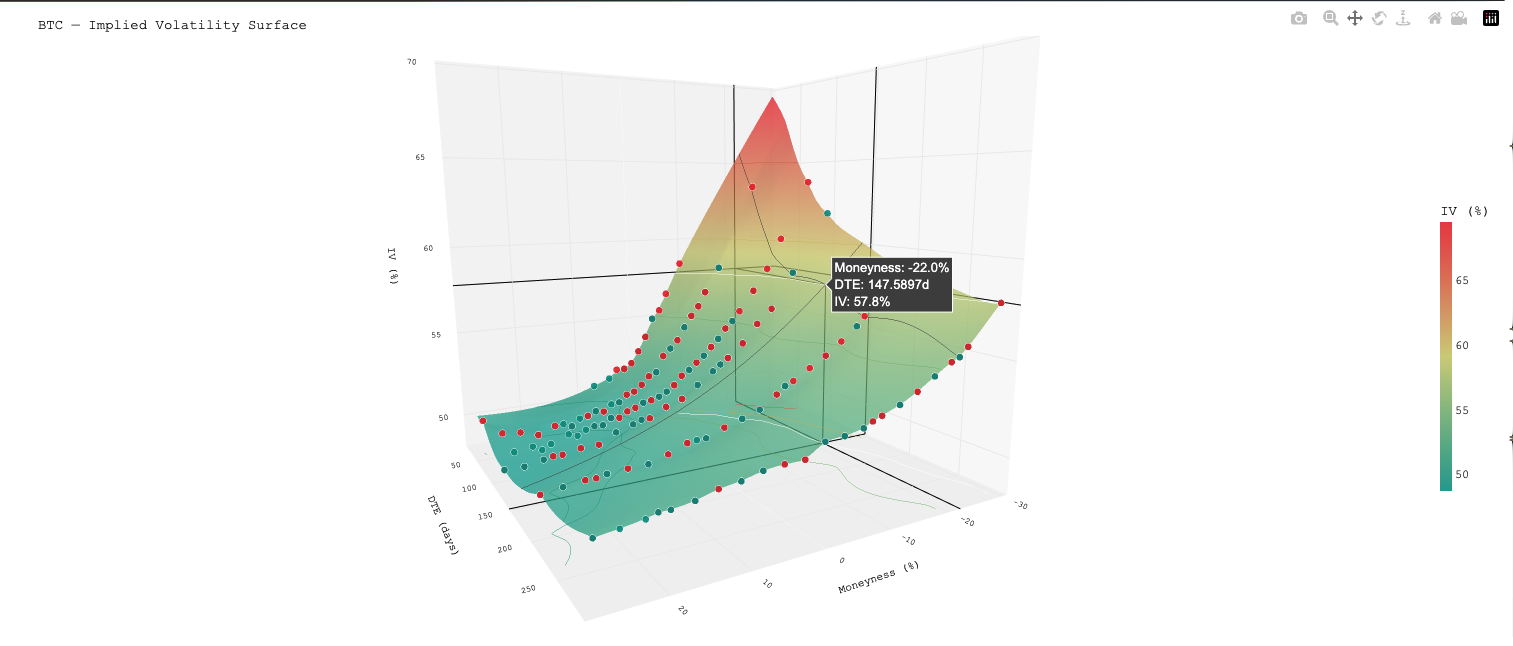
Graphique de la surface de volatilité du Bitcoin depuis Deribit APIGraphique de la courbe futures du Bitcoin recupérée depuis Deribit API
7. Utilities & Date Helpers
The utils and dates modules provide the low-level conversion functions used internally across all adapters. datetime_to_timestamp converts a Python datetime to millisecond epoch (the standard format for most broker REST APIs). timestamp_to_datetime and ts_to_datetime (UTC-aware) perform the reverse. date_difference_days computes a fractional day count between two datetimes — useful for time-to-expiry calculations in derivatives pricing.
python
from datetime import datetime, timezone
from marketconnect_exec.static.utils import( datetime_to_timestamp, timestamp_to_datetime, date_difference_days
)from marketconnect_exec.static.dates import ts_to_datetime
# --- datetime → millisecond timestamp (for API request params) ---start = datetime(2024,1,1,0,0,0)print(datetime_to_timestamp(start))# 1704067200000# --- millisecond timestamp → datetime (naive, local tz) ---print(timestamp_to_datetime(1704067200000))# 2024-01-01 00:00:00# --- millisecond timestamp → datetime UTC-aware (for Deribit responses) ---print(ts_to_datetime(1704067200000))# 2024-01-01 00:00:00+00:00# --- Fractional day difference (time-to-expiry) ---today = datetime(2025,3,14)expiry = datetime(2025,3,28)print(date_difference_days(today, expiry))# 14.0# Practical use: compute DTE for each contract in a vol surfacefor contract in futures: dte = date_difference_days(datetime.now(), contract['expiry'])print(f"{contract['symbol']}: {dte:.1f} days to expiry")
Get marketconnect-exec
marketconnect-exec is available as a standalone Python package. Whether you are running a systematic options strategy on Deribit, managing an equity portfolio through Interactive Brokers, or building a multi-broker execution system, the library gives you a clean, extensible foundation without having to maintain broker-specific integration code.
What you get
Full source code with typed, documented functions and abstract base class.
Unified execution layer: one API for Deribit and IBKR, more brokers via one adapter class.
Normalized enums and mapping tables — no raw broker strings in your strategy code.
Lifetime updates — new broker adapters and features added regularly.
How do I add a new broker to marketconnect-exec?
Subclass AbstractBroker, implement all abstract methods (connect, disconnect, stage_order, get_all_positions, etc.), then call router.register_broker(YourAdapter()). The Execution layer will dispatch calls to your adapter automatically — no other changes needed.
Does it support paper trading / testnet?
Yes. For Deribit, point your credentials at the testnet endpoint (test.deribit.com). For IBKR, connect to port 7497 (TWS paper account) instead of 7496 (live). The adapter initialises with test = 'LIVE MODE' by default — override it in your subclass when connecting to a sandbox environment.
What Python version is required?
Python 3.13 or above is required. The library uses modern type hint syntax (list[dict] instead of List[Dict]) and relies on features introduced in Python 3.10+. Install with pip install -e . from the package root.
Is get_historical_operations normalized across brokers?
No — this is explicitly documented. For Deribit and other crypto brokers it returns a universal transaction log. For IBKR it requires a Flex Query configured in IBKR Account Management; pass the query_id as a kwarg. A UserWarning is raised every time the method is called to remind you of this difference.
Can I use only one broker without registering the other?
Yes. Register only the adapters you need. router.register_broker() is called once per broker and the router only holds what you give it. There is no requirement to register both Deribit and IBKR — a single-broker setup is perfectly valid.